7-1: Compression과 Acceleration 사용
Task 1 - 최적화 없이 BIG-IP LTM 성능 기록
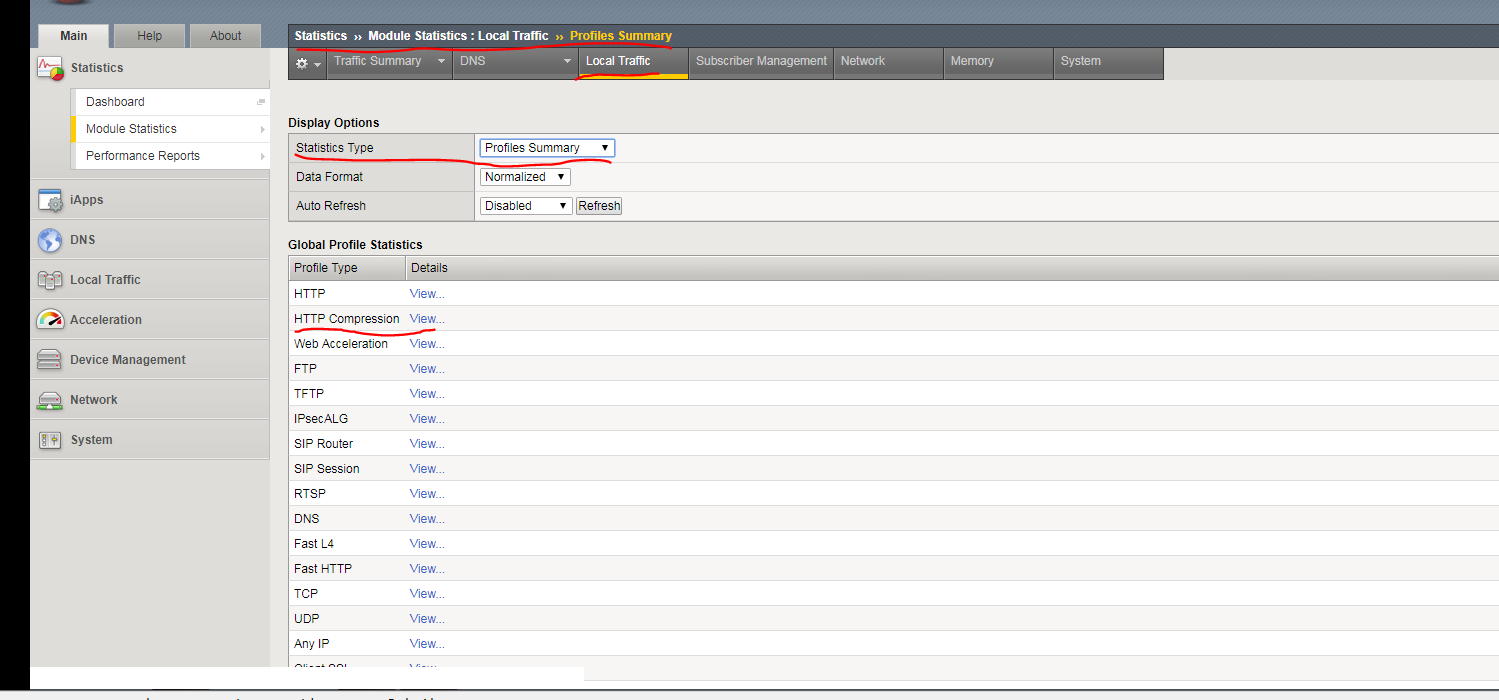
1-1) Local Traffic > Virtual Server > Statistics 페이지에서 Statistics Type List에서 Profiles Summary 선택합니다.
1-2) HTTP Compression에서 View 클릭합니다.
2) Local Traffic > Virtual Server > Statistics에서 http_virtual 클릭합니다.
3) HTTP Profile 및 Stream Profile 2개 모두 None 선택 후 Update합니다.
4-1) Chrome 시작 후 iMacros for Chrome 실행합니다.
4-2) LTM Fund > 10.1.10.20 traffic.iim 선택합니다.
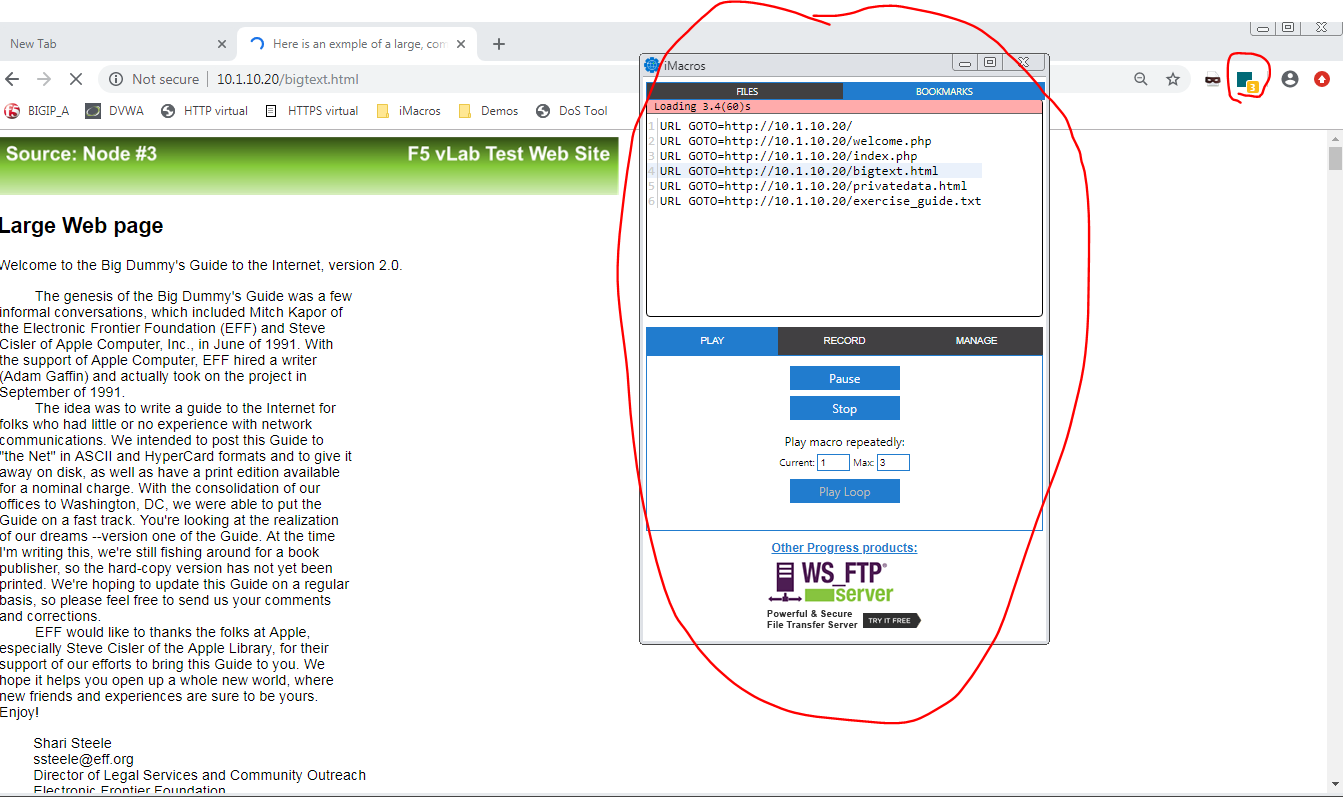
5) 10.1.10.20 traffic.iim에 설정된 페이지들이 설정된 시간에 따라서 차례로 출력됩니다.
Task 2 - HTTP Compression과 Cache 설정
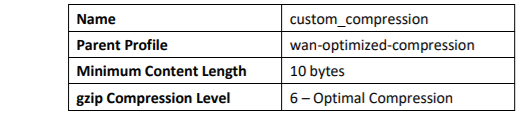
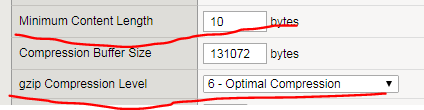
1) Acceleration > Profiles > HTTP Compression 페이지 선택 후 Create를 클릭합니다.
2) 상세 값을 입력합니다. ( Custom에 체크를 해야 상세 값을 설정 할 수 있습니다.)
3) Acceleration > Profiles > Web Acceleration 페이지 선택 후 Create를 클릭합니다.
4) 상세 값을 입력합니다. ( Custom을 체크해야 값을 변경할 수 있습니다.)


5) TMSH를 사용하여 새 Pool과 새 Virtual Server를 생성하겠습니다. 새로운 가상서버에는 방금 만든 프로필과 기본제공 TCP Profiles을 연결하여 사용하겠습니다.
6) Putty에 접속 후 10.1.10.240에 접속하여 다음과 같이 커맨드를 입력합니다.(문법 오류로 실행 못했습니다.)
tmsh create ltm pool http2_pool members add { 10.1.20.11:80 { address 10.1.20.11 } 10.1.20.12:80 {
address 10.1.20.12 } 10.1.20.13:80 { address 10.1.20.13 } } monitor custom_http_monitor

tmsh create ltm virtual http2_virtual destination 10.1.10.21:80 ip-protocol tcp profiles add { http {
} custom_caching { } custom_compression { } oneconnect { } tcp-lan-optimized { context serverside }
tcp-wan-optimized { context clientside } } pool http2_pool
Task 3 - 최적화로 BIP-IP LTM 성능 기록
1) Chrome에서 iMacros을 클릭 후 LTM Fund > 10.1.10.21 traffic.iim 선택합니다.
2) Local Traffic > Virtual Servers > Statistics page 확인

Questions:
What are the Bits In and Bits Out values for http_virtual? > 2.9/23.7M
Did compression reduce the amount of data sent to the user (Bits Out)? > ?
How many total connections were opened for http_virtual? > 620
What are the Bits In and Bits Out values for http_pool? >3/16.2M
Did caching lower the data between BIG-IP LTM and pool members (Bits In)? > ?
What is the pre and post compress values for HTML content? > 0
How many total items were cached? > 0
잘 못 설정하여 Compression 값이 0이 나온 것 같습니다.
'기타 > 인턴활동' 카테고리의 다른 글
| Lesson 9 - F5를 활용한 Support SSL 실습 (0) | 2021.07.21 |
|---|---|
| Lesson 8 - F5를 활용한 Presistence Profiles 실습 (0) | 2021.07.21 |
| Lesson 5 - Health Monitors 실습 (0) | 2021.07.20 |
| Lesson 3 - F5 를 활용한 Virtual Serevers 실습 (0) | 2021.07.19 |
| Lesson 2 - F5를 활용한 네트워크 구성 (Processing Traffic) (0) | 2021.07.15 |